
blender_shadeless_materials
Blender Shadeless Material
Blender 2.8 and 2.9 did away with the Shadeless checkbox once they moved to Eevee and with more emphasis on shader nodes.
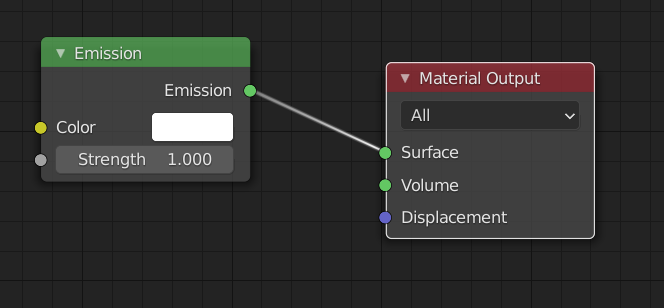
Shadeless is pretty easy in nodes though. The steps below are for an object having a single color.
- With the object created, create or modify its shader, choose Use Nodes in the Material properties panel
- In the Shader Editor window, you may have existing nodes there if so…
- Delete the Principal Shader
- Only keep the Material Output node
- Add an Emissions node
- Drag your connector line from the Emission green dot to the surface dot of the Material Output node
- Pick the color from the color picker however you need
- The viewport and the render should take on that color and be shadeless.
- Remember that a 3D object that's shadeless will have dimension because no light can bounce off it in varied direction
blender_shadeless_materials.txt · Last modified: by smickster